
The Twitter character limit on X is 280 characters per post for a standard account, as of September 2026. X Premium subscribers can write long posts of up to 25,000 characters, and everyone can read them.
The catch is that X doesn't count characters the way a word processor does. A link always costs 23 characters, every emoji costs 2, and some ordinary-looking symbols cost 2 as well. Below you'll find every X text limit, exactly how the counting works, and how to plan a post so it fits the first time.
What is the Twitter character limit in 2026?
X's Help Center says you can compose a post of "up to 280 characters" (X Help). It applies to anyone without a paid subscription, and replies are held to the same limit as any other post.
The same page describes the counter in the composer: a small circle tracks your progress around its edge as you type, and when you reach 280 characters it switches to filling the circle. That circle, not a word processor, is the final judge of whether a post fits.
The number is simple. What goes into it is not, which is why a post that shows 270 characters in a regular Character Counter can still be too long for X.
X character limits for every field
Posts get the attention, but X has separate limits for your profile and other text. These are the figures from X's own help pages as of September 2026:
Field | Limit | Source |
|---|---|---|
Post (standard account) | 280 characters | |
Post (X Premium) | 25,000 characters | |
Username (@handle) | 15 characters | |
Display name | 50 characters | |
Bio | 160 characters | |
List name | 25 characters | |
Image description (alt text) | 1,000 characters | |
Media per post | Up to 4 photos, 1 GIF or 1 video |
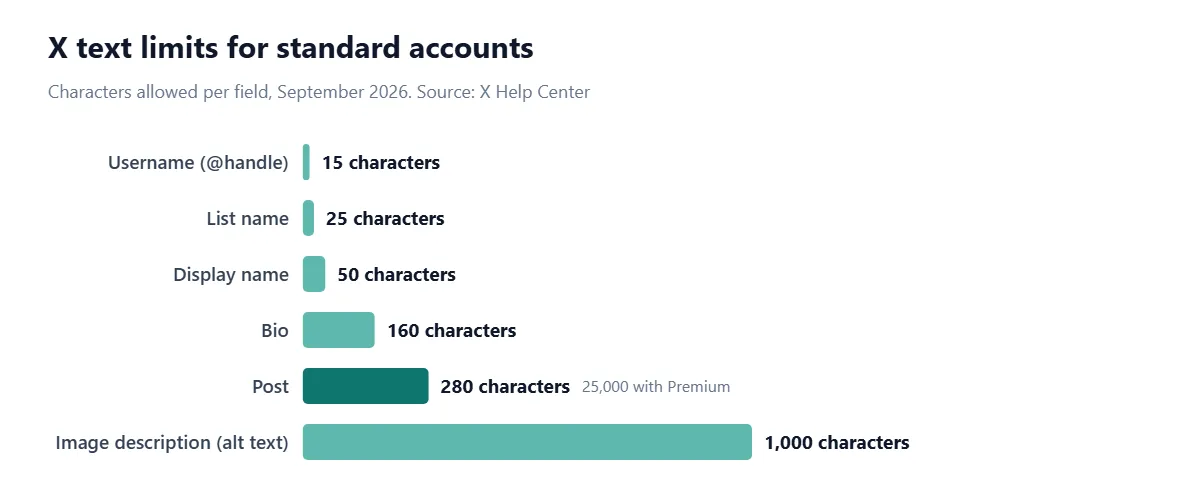
A few details the table can't hold. Usernames can only use letters, numbers and underscores (username rules), and list names can't begin with a number (X Lists help). The 1,000-character alt text limit is generous, but X's own guidance points out that some older screen readers stopped reading after 200 to 250 characters, so shorter descriptions are still kinder (X Help).
Direct messages are the one field where you'll see a number quoted everywhere but not on X's help pages. Twitter removed the 140-character cap on DMs back in 2015 (X blog), and third-party guides commonly cite 10,000 characters. We couldn't confirm that figure on a current X page, so treat it as unofficial.
How does X count characters?
X uses what its developer documentation calls a weighted count. Most characters count as 1, but some count as 2, and the post is valid as long as the weighted total is 280 or less (X Developer Platform). Text is normalized first (Unicode Normalization Form C), so an accented letter counts once however it was typed.
The exact rules live in the open-source twitter-text configuration that X's apps use. It gives a weight of 1 to a set of Unicode ranges and a weight of 2 to everything else (twitter-text config). The ranges that count as 1 include:
Code points 0 to 4351: basic Latin letters, digits and punctuation, accented Latin letters, plus Greek, Cyrillic, Hebrew, Arabic, the Indic scripts, Thai and Georgian.
A few general punctuation ranges: spaces of different widths, hyphens and dashes, curly quotation marks, and the prime marks used for feet and inches.
Everything else counts as 2: Chinese, Japanese and Korean characters, emoji, and a surprising number of everyday symbols.
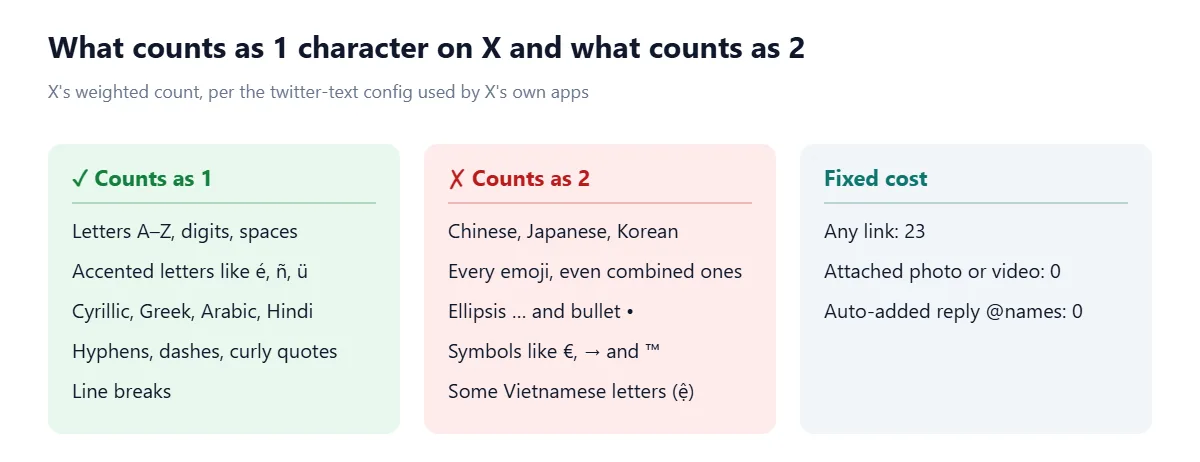
We ran the rules through the twitter-text library to check the edge cases. An em dash (—) counts as 1, but an ellipsis character (…) counts as 2, and so do the bullet (•), the euro sign (€) and arrows like →. A Russian, Hindi or Arabic word counts one per character, just like English.
Do links count toward the 280-character limit?
Yes, but always as exactly 23 characters. X wraps every URL in its t.co link shortener, so a 100-character tracking link and a 12-character domain both cost 23 (X Developer Platform).
Two practical consequences. First, there's no point shortening a link with a third-party service to save space on X, because it will cost 23 either way. Second, a very short link actually costs more than it looks: typing example.com uses 11 characters on screen but 23 in the count.
Do emojis count as two characters on X?
Yes. X's documentation says all emoji count as 2 characters, "regardless of complexity" (X Developer Platform). That includes emoji with a skin-tone modifier and family or profession emoji built from several pieces joined together, which other counters often report as 4, 7 or even 11 characters.
This is one reason counts differ between tools. A general Character Counter shows emoji the way you see them, while X applies its own weights. When a post is close to the limit, trust the counter in X's composer over any outside tool, or check it against the X limit in our Character Limit Checker and leave a small margin for emoji and links.
Do @mentions, replies and photos count?
Auto-added @names in replies: no. The usernames X adds at the start of a reply don't count toward 280 (X Developer Platform).
@mentions you type yourself: yes. A mention in the body of a post counts like any other text, so @wordscalculator costs 16 characters.
Photos, GIFs and videos: no. Media attached through X's own apps counts as 0 characters.
How many characters can X Premium users post?
X's Premium page says longer posts "allow subscribers to post up to 25,000 characters," and lists the feature under what every Premium tier gets, including Basic (About X Premium). Non-subscribers can't write long posts, but they can read them.
There's a wrinkle most guides skip. X's posting guide says Premium users can write "up to 4,000 characters" on mobile and "up to 25,000 characters" on the web (How to post). If you plan to write something long, do it on x.com in a browser.
Long posts are cut off in the timeline, and readers tap Show more to see the rest. X doesn't publish the exact cut-off point, so assume that only the opening lines are seen by most people and put your point there.
Chinese, Japanese and Korean: why the limit feels like 140
Because each Chinese, Japanese or Korean character counts as 2, a post written entirely in those scripts fits 140 characters, not 280. It's deliberate, not a glitch in your app, and it's the reason posts in these languages often look short next to English ones.
Mixed text is counted character by character. A Japanese post with an English brand name and a link is the sum of its parts: 2 per Japanese character, 1 per Latin letter and 23 for the link. Korean counts as 2 even though Hangul is an alphabet, because its code points sit outside the 1-weight ranges.
How to plan a post that fits 280 characters
Work out the fixed costs before you write. Here's a real example: a short announcement with one link and two emoji.
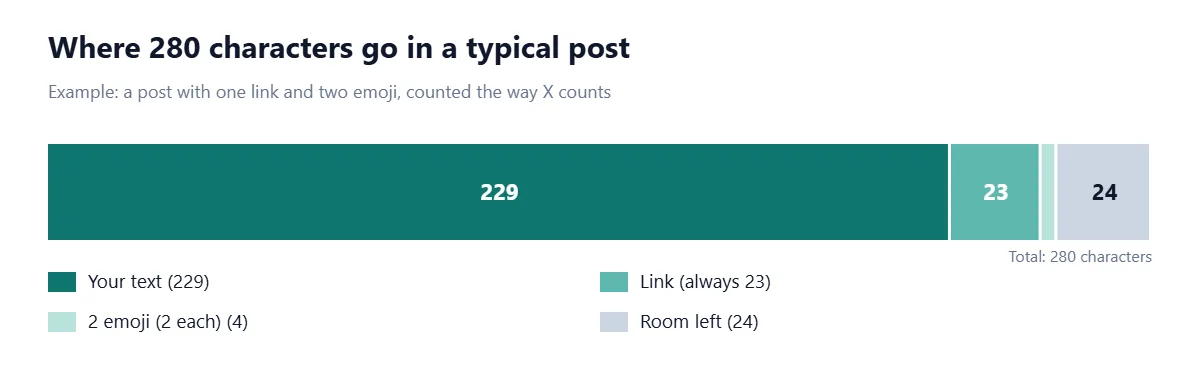
Start with 280.
Subtract 23 for each link. One link leaves 257.
Subtract 2 for each emoji you plan to use. Two emoji leave 253.
Subtract any @mentions or hashtags you must include. They count at 1 per character, including the @ or # sign.
What's left is your text budget. Write to about 20 characters under it so you have room for a last-minute edit.
If you're wondering how much that is in words, it depends on the length of your words. Our guide to how many words is 280 characters works through the numbers.
Common mistakes with the X character count (and how to avoid them)
Trusting a plain character counter. It will count a long URL at its full length and a family emoji as several characters. X counts 23 and 2.
Assuming … is one character. Many phones and word processors turn three periods into a single ellipsis character. On X it costs 2, which explains counts that look "off by one" compared with other tools.
Pasting bullet points. The • character costs 2. A hyphen or a line break costs 1 and reads just as well.
Forgetting the space before a link. The space is a character. So are line breaks.
Writing long posts on mobile. Premium's 25,000 limit applies on the web; the apps cap long posts at 4,000 per X's own help page.
Copying text from Word with stray spaces. Double spaces and trailing line breaks count. A Text Cleaner removes them in one pass.
Tips for writing within the limit
Lead with the point. Whether the post is 80 or 8,000 characters, the first line decides whether anyone reads the rest.
Cut qualifiers first. Words like "really", "just" and "actually" are the easiest 10 characters you'll find.
Use numerals. "3" is one character; "three" is five.
Use a thread for steps, a long post for arguments. Threads suit lists where each point stands alone. A single Premium post suits one continuous argument.
Move detail into alt text. Describing an image well belongs in its 1,000-character description, not the post body.
To check a draft before it goes near the composer, paste it into our Character Limit Checker, which tests your copy against X's limits alongside Instagram, LinkedIn, YouTube and Google. Then remember the fixed costs: 23 per link and 2 per emoji.
Frequently asked questions
How many characters are allowed in a tweet?
A post on X can have up to 280 characters for a standard account as of September 2026. X Premium subscribers can post up to 25,000 characters.
Do spaces count in the Twitter character limit?
Yes. Spaces and line breaks each count as one character on X, just like letters.
Does a link count toward the 280 characters on X?
Yes, every link counts as exactly 23 characters, however long or short the actual URL is, because X shortens it with t.co.
Do emojis count as 2 characters on Twitter?
Yes. Every emoji counts as 2 characters on X, including emoji with skin tones and combined emoji such as families.
What is the Twitter bio character limit?
An X bio can be up to 160 characters. Your display name can be up to 50 characters and your username up to 15.
How many characters can X Premium users post?
X Premium subscribers on every tier can post up to 25,000 characters on the web. X's help page says the mobile apps allow up to 4,000.
Why can I only write 140 characters in Japanese or Chinese on X?
Chinese, Japanese and Korean characters each count as 2 on X, so a post in those scripts fits 140 characters within the 280 limit.
What is the character limit for alt text on X?
Image descriptions on X can be up to 1,000 characters, though shorter descriptions are easier for screen reader users.
What is the X character limit?
X (formerly Twitter) allows 280 characters per post for standard accounts, and up to 25,000 characters for X Premium subscribers.
Sources
X. How to post. X Help Center, 2026.
X. About X Premium. X Help Center, 2026.
X. Counting characters. X Developer Platform, 2026.
X. twitter-text configuration (v3). GitHub.
X. Username rules. X Help Center, 2026.
X. How to customize your profile. X Help Center, 2026.
X. About X Lists. X Help Center, 2026.
X. How to write great image descriptions. X Help Center, 2026.
Twitter. Removing the 140-character limit from Direct Messages. Twitter blog, 2015.

Comments