
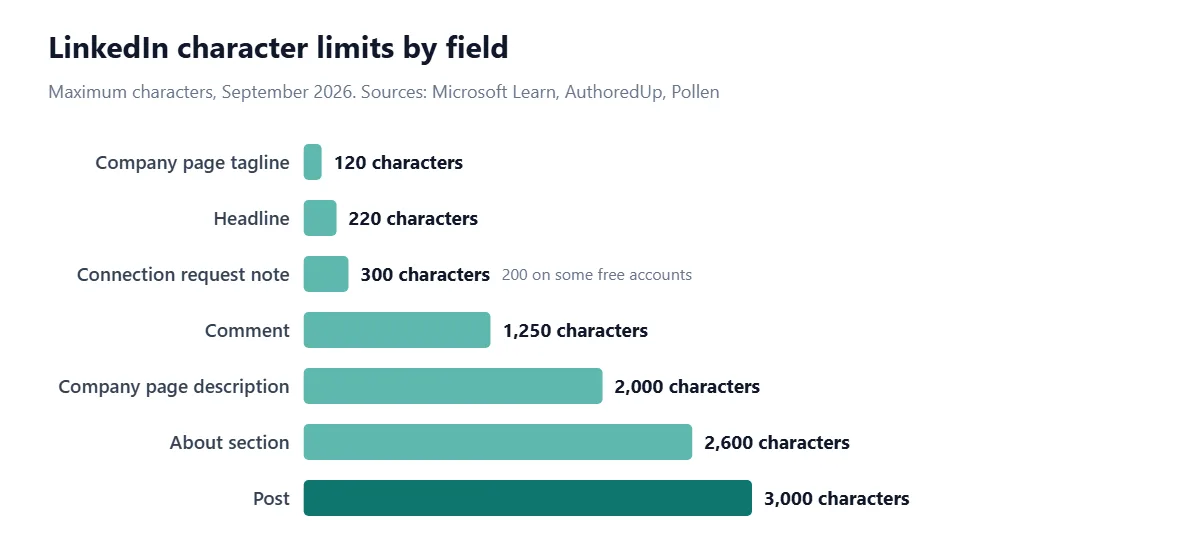
The LinkedIn character limit for a post is 3,000 characters, as of September 2026. Your headline can be up to 220 characters, your About section 2,600, and a comment 1,250.
The post limit is the one people ask about most, but it's rarely the one that matters. Only the first 140 or so characters show on a phone before LinkedIn hides the rest behind "see more". Below you'll find every LinkedIn text limit, where each figure comes from, and how to write for the part people actually see.
What is the LinkedIn character limit for posts?
3,000 characters, including spaces, line breaks, emoji, hashtags and @mentions. LinkedIn's developer documentation on Microsoft Learn states it plainly: "The maximum length of the text of a UGC Post is 3000 characters" (Microsoft Learn).
Every 2026 guide we checked gives the same figure for the app. At an average of five or six characters per word including the space, 3,000 characters is somewhere around 450 to 550 words (how characters convert to words), which is plenty for a detailed post. If you need more, LinkedIn articles are the long-form option (see below).
A note on sources. LinkedIn doesn't publish most of these limits in one place, so for anything that isn't in its developer documentation we've relied on 2026 guides from tools that test LinkedIn directly: AuthoredUp (updated August 2026), Pollen and Linked Helper (updated September 2026). Where they disagree, we say so.
LinkedIn character limits at a glance
Field | Limit | How sure |
|---|---|---|
Post | 3,000 | Official (developer docs) |
Headline | 220 | All sources agree |
About section | 2,600 | All sources agree |
Comment | 1,250 | All sources agree |
Connection request note | 300 (200 on some free accounts) | Sources disagree on free |
Message to a connection | 8,000 | Two sources agree |
InMail subject / body | 200 / about 1,900–2,000 | Body figure varies |
Experience description | 2,000 per role | Two sources agree |
Company page tagline | 120 | Two sources agree |
Company page description | 2,000 | Two sources agree |
Every limit counts characters, not words, and spaces count. To check a draft against several of these at once, paste it into our Character Limit Checker, which includes LinkedIn alongside X, Instagram and YouTube.
How many characters show before "see more" on LinkedIn?
Roughly 140 characters on a phone and around 210 on desktop, according to AuthoredUp. Other guides put it anywhere from about 200 (Linked Helper) to 250 (Pollen). They disagree because the cut is based on lines, not a fixed character count: it's usually two or three lines, and line breaks use up lines quickly.
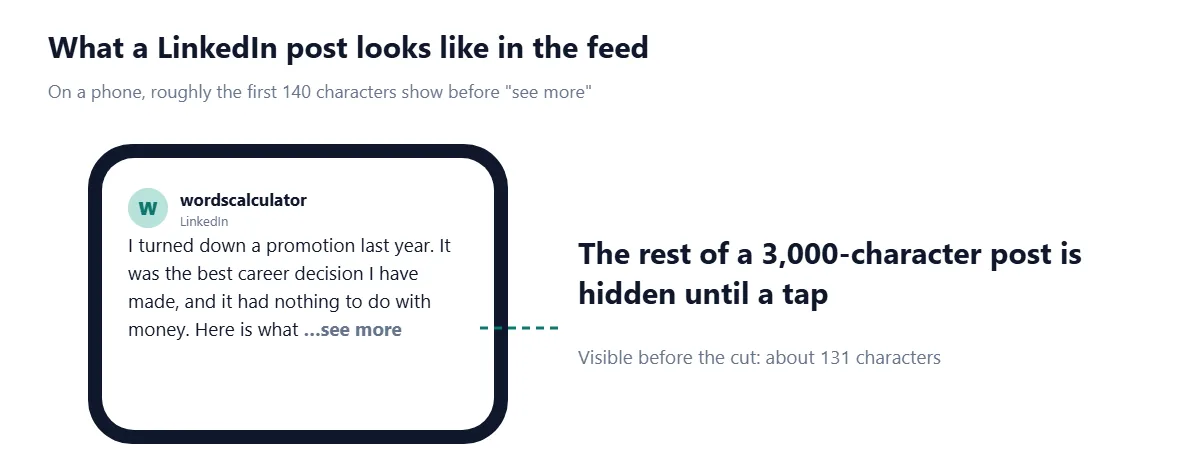
The safe rule is to plan for the smallest figure. If your first 140 characters make a complete, interesting point, the post works on every screen. If the hook only lands at character 200, most mobile readers never see it.
LinkedIn headline character limit
Your headline, the line under your name, can be up to 220 characters. All three 2026 guides agree on this figure (AuthoredUp, Pollen, Linked Helper).
You won't get all 220 characters seen in most places. Headlines are shortened in several spots, and AuthoredUp estimates only about 60 to 70 characters show in search results, so put the part that matters first. A useful pattern is role, then specialty, then proof:
Weaker: "Passionate about helping people | Lifelong learner | Coffee enthusiast | Senior Product Designer at Acme"
Stronger: "Senior Product Designer at Acme | Design systems for fintech apps | Cut onboarding time 40%"
Both fit easily within 220. The difference is that the second one still makes sense when only the first 60 or so characters show.
LinkedIn About section character limit
The About section allows 2,600 characters. As with posts, only the start is visible: about the first 300 characters show before a "see more" link (AuthoredUp, Pollen).
That makes the About section a two-part job. Use the first 300 characters to say who you help and how, in plain words. Use the rest for detail: specialties, results, tools, and how to contact you. 2,600 characters is roughly 400 words, so you have room for three or four short paragraphs and a list.
Draft it somewhere else first. A Word Counter will show both words and characters as you write, and a Text Cleaner will strip the double spaces and stray line breaks that sneak in when you paste from a CV.
LinkedIn comment character limit
Comments are limited to 1,250 characters (AuthoredUp, Linked Helper). That's a generous 180 to 200 words, more than enough for a thoughtful reply.
Some people use the comments to continue a post that ran past 3,000 characters. It works, but each comment is capped at 1,250, and readers have to open the comments to find it. If you regularly run out of room, an article is the better format.
Connection request and message limits
A personalized note on a connection request can be up to 300 characters. That part everyone agrees on. Where sources split is on free accounts: Pollen and ReactIn say free (Basic) members get a 200-character box, while Taplio says both free and Premium accounts get 300.
Both Taplio and ReactIn also report that free members can only send a small number of personalized notes each month, commonly observed as about five, after which invitations go without a note. LinkedIn doesn't publish that number, so it may vary between accounts.
The practical answer: write your note to 200 characters. It will fit on any account, and a short note is more likely to be read anyway.
Messages to connections: up to 8,000 characters (AuthoredUp, Linked Helper).
InMail subject: 200 characters.
InMail body: reported as 1,900 (Pollen, Linked Helper) or 2,000 (AuthoredUp). Stay under 1,900 to be safe.
LinkedIn article, profile and company page limits
Articles are LinkedIn's long-form format, and their limits are much higher than posts. AuthoredUp and Linked Helper put the article body at around 110,000 characters, which is well over 15,000 words. Guides disagree on the article title limit (100 or 150 characters), so keep titles under 100.
Field | Limit | Reported by |
|---|---|---|
Experience description | 2,000 per role | AuthoredUp, Linked Helper |
Experience job title | 100 | Linked Helper |
Skill name | 80 | Linked Helper |
Company page tagline | 120 | AuthoredUp, Pollen |
Company page description | 2,000 | AuthoredUp, Pollen |
Article body | About 110,000 | AuthoredUp, Linked Helper |
Treat the company page description like a personal About section: lead with what the company does and who it's for, then add detail. The 120-character tagline works best as a single clear line about what the company does, not a slogan.
How to post more than 3,000 characters on LinkedIn
Cut first. Most posts that run over 3,000 characters have a second post hiding in them. Split it and publish the second part later in the week.
Publish an article instead. Articles are built for long-form writing, with a body limit dozens of times larger than a post.
Continue in a comment. Add up to 1,250 more characters in the first comment and say "continued in the comments" at the end of the post. Use it sparingly.
Link out. Put the full piece on your blog or newsletter and use the post to make the case for reading it.
Common LinkedIn character limit mistakes
Writing to 3,000 instead of to the fold. The limit is the ceiling, not the target. Most readers decide in the first 140 characters.
Opening with white space. Several one-word lines followed by blank lines push your actual point below "see more".
Front-loading the headline with adjectives. "Passionate, driven, results-oriented" uses 36 characters and says nothing about what you do.
Writing a 300-character connection note on a free account. If your box only allows 200, a note drafted at 300 won't fit and you'll be trimming it in a tiny text field. Write to 200.
Pasting from Word without cleaning. Double spaces and extra line breaks count toward every limit.
Reusing the same text everywhere. A 3,000-character LinkedIn post won't fit on X (280) or in an Instagram preview. See our guides to the X character limit and Instagram caption limits.
Before you post, paste your draft into the Character Limit Checker to test it against LinkedIn's limits, then read your first 140 characters on their own. If they don't make someone want to tap "see more", rewrite them.
Frequently asked questions
What is the LinkedIn character limit for posts?
LinkedIn posts can be up to 3,000 characters, including spaces, emoji and hashtags, as of September 2026.
How many characters is the LinkedIn headline?
The LinkedIn headline can be up to 220 characters, but it is shortened in places like search results, so put the key words first.
What is the character limit for the LinkedIn About section?
The About section can be up to 2,600 characters, and roughly the first 300 show before "see more".
How many characters show before "see more" on LinkedIn?
About 140 characters on mobile and around 200 to 250 on desktop. The cut is based on lines, so line breaks can bring it forward.
What is the LinkedIn comment character limit?
A LinkedIn comment can be up to 1,250 characters.
How many characters can a LinkedIn connection note have?
Up to 300 characters. Some sources report that free accounts get only 200, so writing to 200 characters is the safe choice.
Do spaces count in LinkedIn's character limit?
Yes. Spaces, line breaks, emoji, hashtags and @mentions all count toward LinkedIn's character limits.
How many words is 3,000 characters on LinkedIn?
Roughly 450 to 550 words, depending on how long your words are. Paste the draft into a word counter to see both figures.
Sources
Microsoft. UGC Post API. Microsoft Learn (LinkedIn developer documentation), 2026.
AuthoredUp. LinkedIn character limits: every limit you need to know. AuthoredUp, 2026.
Pollen. LinkedIn character limits 2026: full reference. Pollen, 2026.
Linked Helper. LinkedIn character limit by category. Linked Helper, 2026.
Taplio. LinkedIn connection request limits in 2026. Taplio, 2026.
ReactIn. LinkedIn connection request note character limit 2026. ReactIn, 2026.

Comments