
The YouTube title character limit is 100 characters, including spaces. Descriptions can be up to 5,000 characters and the combined tag list up to 500, according to YouTube Help as of September 2026.
Those are the maximums, not the targets. On most screens viewers only see the start of a title and the first few lines of a description, so the real question is what fits in that visible part. This guide lists every YouTube text limit we could confirm, explains a few counting quirks, and shows how to write titles and descriptions that work at a glance.
YouTube character limits at a glance
Field | Limit | Source |
|---|---|---|
Video title | 100 characters | YouTube Help |
Video description | 5,000 characters | YouTube Help |
Tags (all tags combined) | 500 characters | YouTube Data API |
Playlist title | 150 characters | YouTube Help |
Playlist description | 5,000 characters | YouTube Help |
Channel description | 1,000 characters | YouTube Data API |
Handle | 3–30 characters (Latin scripts) | YouTube Help |
Hashtags per video | More than 60 and all are ignored | YouTube Help |
Shorts title and description | Same fields as any video | YouTube Help |
The title and description limits come from YouTube's Edit video settings page, which says both fields "cannot include invalid characters". The developer documentation is more specific: titles and descriptions may contain any valid UTF-8 character except the angle brackets < and > (YouTube Data API). If an upload form refuses to save, a stray angle bracket pasted from a script is a likely cause.
Playlist limits come from YouTube's playlist help page, which also bans the angle brackets and the Unicode line separator character. Handles must be 3 to 30 characters for most languages, with shorter ranges for scripts such as Han and Hangul (YouTube Help).
YouTube title character limit: 100, but fewer are seen
You can type 100 characters, and YouTube will stop you at 100. The catch is display. YouTube's own tips page puts it plainly: "Viewers may only see part of your title. So aim to keep it short and put the most important words near the beginning" (YouTube Help).
How much shows depends on where the title appears: search results, the home feed, suggested videos, a TV, or a phone held upright. YouTube doesn't publish a cut-off, and it changes with the layout. You'll see 60 or 70 characters quoted online, but treat any fixed number as a rough guess.
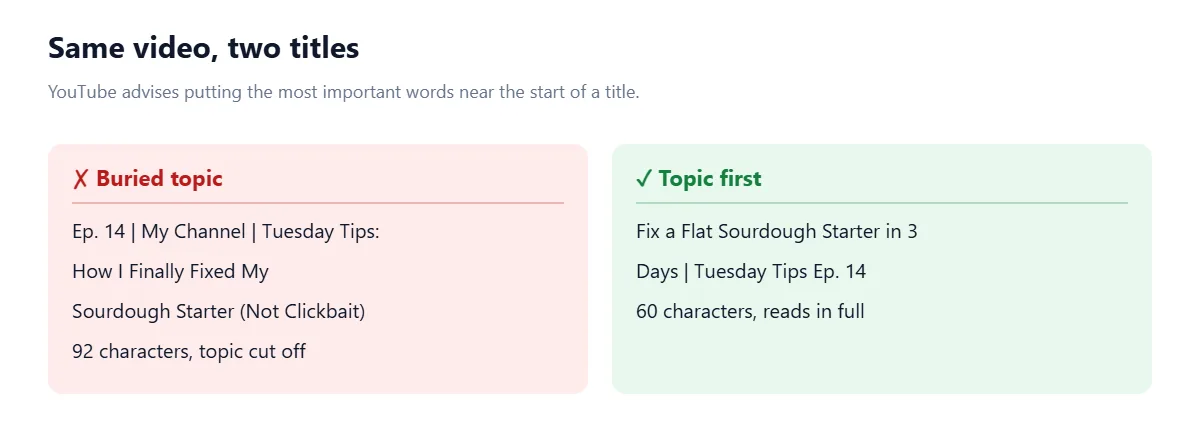
A better rule: make the first 40 to 50 characters work on their own. If a viewer only sees that much, they should still know what the video is about. Anything after that (series name, episode number, a bonus detail) is extra.
How long should a YouTube title be?
Long enough to say what the video delivers, short enough to read at a glance. For most videos that lands somewhere around 40 to 70 characters. YouTube's advice points the same way:
Be accurate. The title should match the video. If it doesn't, YouTube warns viewers may stop watching, which can hurt how the video is shown to others.
Limit ALL CAPS and emoji. Use them for emphasis, not as decoration.
Save episode numbers and branding for the end. They matter to regular viewers, not to someone deciding whether to click.
Those three points come straight from YouTube's thumbnail and title tips. There's also a hard line: YouTube's spam policy prohibits "maliciously misleading titles, thumbnails, descriptions, or imagery", with the example of a title promising a full sports match when the video is only a clip (YouTube spam policy).
To test a title before uploading, paste it into the Character Limit Checker, which checks copy against YouTube, Google and social media limits in one go.
YouTube description character limit: 5,000
The description holds up to 5,000 characters (YouTube Help). At about six characters per English word (letters plus a space), that's roughly 800 words, enough for a full summary, chapters, links and credits.
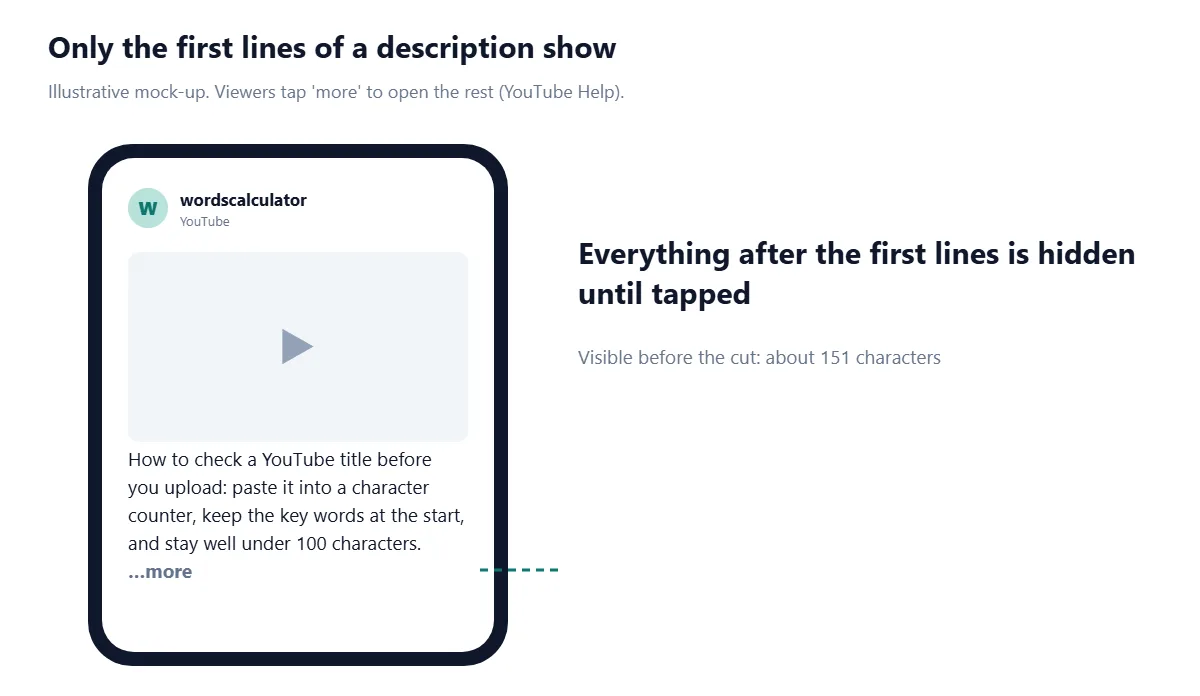
Most viewers won't read that far. YouTube notes that the complete description only appears after someone clicks "Show more" on desktop or "more" on mobile, and it recommends using the first few lines to describe the video "because it's what viewers will see first".
Characters or bytes?
Here's a quirk most guides miss. YouTube Help describes the description limit as 5,000 characters, but the YouTube Data API documents it as 5,000 bytes (YouTube Data API). For English text there's no difference, because each plain letter, digit and space is one byte in UTF-8. Characters in many other scripts, such as Devanagari and most Chinese characters, take three bytes each, and emoji take four (UTF-8).
So if you post through a scheduling tool or another app that uses the API, a description written mostly in Hindi or packed with emoji could be refused well before it reaches 5,000 characters. When a description is long and not in English, check its byte size in the Character Counter before you paste it in.
What to put in a YouTube description
Open with one or two sentences that say what the video covers. Use the 1–2 main words people search for; YouTube suggests featuring them in both the title and description.
Add chapters. Type timestamps on their own lines. The first must be 00:00, you need at least three in ascending order, and each chapter must be at least 10 seconds long (YouTube Help).
Add links. Note that the API docs say links only become clickable when the channel meets requirements such as verification or having advanced features enabled (YouTube Data API).
Mention related videos and playlists. YouTube's description tips suggest linking playlists and other channels.
Finish with hashtags, if you use them. Keep it to a few (see below).
Write a unique description for every video. YouTube says this "makes it easier to find through search" (YouTube Help). Pasting the same block of links under every upload is fine at the bottom, but the opening lines should be specific to the video.
YouTube tags character limit: 500 in total
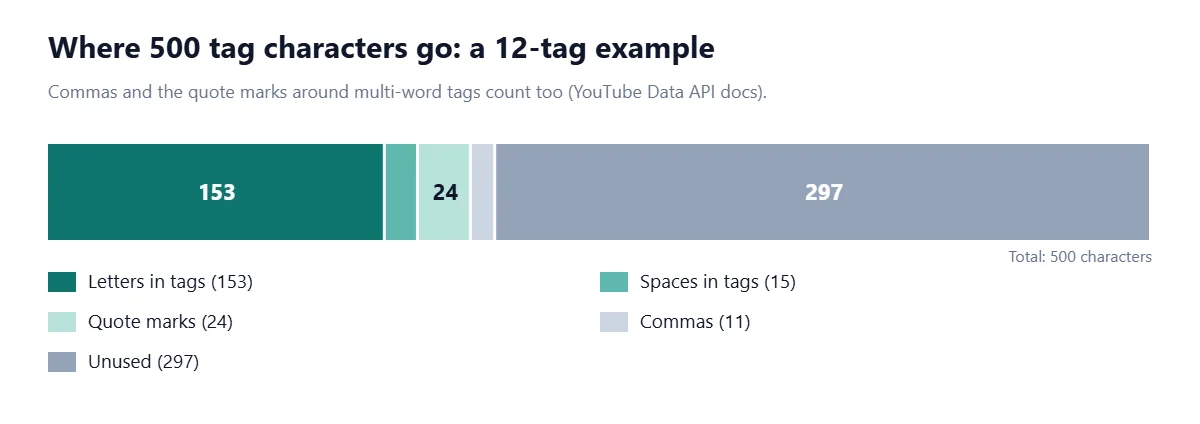
Tags share a single 500-character budget. The Data API documentation spells out how it's counted: the commas between tags count, and a tag containing a space is treated as if it were wrapped in quotation marks, with the quotes counting as well. Its example: Foo-Baz counts as 7 characters, but Foo Baz counts as 9 (YouTube Data API).
In practice few people hit the limit, and it isn't worth trying. YouTube says "tags play a minimal role in your video's discovery" and that the title, thumbnail and description matter more. Tags are most useful for words people often misspell (YouTube Help). The same page warns that adding excessive tags to your description breaks YouTube's spam policies.
YouTube hashtag limits
Hashtags go in the title or description, not in the tag field. If a video has more than 60 hashtags, YouTube ignores all of them. Up to three hashtags appear near the title, chosen by YouTube, and hashtags can't contain spaces, so multi-word ones are joined up (#TwoWords) (YouTube Help).
Every hashtag also eats into your 100-character title or 5,000-character description. Two or three relevant hashtags at the end of the description usually do the job without cluttering the title.
YouTube Shorts title and description limits
Shorts don't have separate limits. You upload them through YouTube Studio like any other video and fill in the same video details, so the 100-character title and 5,000-character description apply (YouTube Help). A Short can be up to three minutes long with a square or vertical aspect ratio.
The difference is how they're watched. Shorts are made for phone screens, so a title that makes its point in a few words suits them better than one that uses all 100 characters.
Playlist, channel and handle limits
Playlist title: 150 characters. Playlist description: 5,000 characters (YouTube Help).
Channel description: 1,000 characters, per the channel resource in the YouTube Data API.
Channel keywords: may be truncated past 500 characters (same API page).
Handle: 3–30 characters in most languages; letters and numbers plus underscores, hyphens, periods and Latin middle dots, but not at the start or end (YouTube Help).
We couldn't confirm a current, official limit for channel names or comments, so we've left them out rather than repeat numbers from other sites.
Common mistakes with YouTube titles and descriptions
Front-loading the channel name. "MyChannel | Episode 42 | …" pushes the topic out of view. YouTube itself recommends putting branding at the end.
Writing a 100-character title because you can. A long title is more likely to be cut off, and the cut usually lands in the most interesting part.
Opening the description with links. The first lines are what shows. Use them to describe the video.
Forgetting the 00:00 timestamp. Without it, chapters won't appear.
Stuffing tags or hashtags. Past 60 hashtags YouTube ignores them all, and excessive tags can count as spam.
Pasting messy text. Scripts copied from documents often carry double spaces and odd line breaks; run them through the Text Cleaner first.
The same front-loading rule applies to search results on Google, where titles and meta descriptions are also cut to fit the screen. Our guide to meta title and description length covers the numbers there, and the Instagram limits guide does the same for captions.
Frequently asked questions
What is the YouTube title character limit?
YouTube video titles can be up to 100 characters, including spaces. Titles can't contain the < or > characters.
How many characters can a YouTube description have?
Up to 5,000 characters. Only the first few lines show until the viewer clicks 'Show more' or 'more', so put the key information at the top.
What is the character limit for YouTube tags?
All tags together can use up to 500 characters. Commas between tags count, and tags with spaces are counted as if wrapped in quotation marks.
How long should a YouTube title be?
Aim for about 40 to 70 characters with the main words at the start. YouTube says viewers may only see part of a title, so the opening words have to carry it.
Do YouTube Shorts have a different title limit?
No. Shorts use the same video details as regular uploads, so titles can be 100 characters and descriptions 5,000, though short titles suit a phone screen better.
How many hashtags can you use on YouTube?
If a video has more than 60 hashtags, YouTube ignores all of them. Two or three relevant hashtags are usually enough.
What is the YouTube playlist title limit?
Playlist titles can be up to 150 characters and playlist descriptions up to 5,000 characters.
Do YouTube tags still matter?
Only a little. YouTube says tags play a minimal role in discovery and are mainly useful for commonly misspelled words; the title, thumbnail and description matter more.
Sources
YouTube Help. Edit video settings. Google.
YouTube Help. Tips for video descriptions. Google.
YouTube Help. Thumbnail & title tips. Google.
YouTube Help. Add tags to your YouTube videos. Google.
YouTube Help. Find playlists & videos using hashtags. Google.
YouTube Help. Video chapters. Google.
YouTube Help. Manage playlists in YouTube Studio. Google.
YouTube Help. Handles overview. Google.
YouTube Help. Upload YouTube Shorts. Google.
YouTube Help. Spam, deceptive practices & scams policies. Google.
Google for Developers. YouTube Data API: Videos.
Google for Developers. YouTube Data API: Channels.
UTF-8, Wikipedia.

Comments