
The Instagram character limit for captions is 2,200 characters for feed posts and Reels, as of September 2026. Only about the first 125 characters show before Instagram cuts the caption off with "more", so your opening line does most of the work.
The other number that changed recently is hashtags. Instagram now allows 5 hashtags per post or Reel, down from the 30 that most guides (and Meta's own developer documentation) still quote. Below you'll find every Instagram text limit, how confident you can be in each one, and how to write captions that survive the cut.
What is the Instagram character limit for captions?
Meta's developer documentation for publishing to Instagram sets a maximum of 2,200 characters per caption (Meta for Developers). Scheduling tools publish through that API, so the same ceiling applies to them.
Everything you type in the caption box counts: letters, spaces, line breaks, emoji, hashtags and @mentions. There's no separate allowance for hashtags, so five long hashtags at the end of a caption come out of the same 2,200.
Reels use the same caption box and the same 2,200-character limit.
Instagram character limits at a glance
Some of these come straight from Meta. Others aren't published on a page we could open, so we've marked how confident you can be. These are the figures as of September 2026:
Field | Limit | Confidence |
|---|---|---|
Post or Reel caption | 2,200 characters | Official (Meta developer docs) |
Hashtags per post or Reel | 5 | Official announcement, Dec 2025 |
@mentions per caption | 20 | Official (Meta developer docs) |
Bio | 150 characters | Official (Instagram Help) |
Username | 30 characters | Widely reported, not on a help page |
Display name | 30 characters | Widely reported |
Comment | 2,200 characters | Widely reported |
Direct message | 1,000 characters | Widely reported |
Note | 60 characters | Widely reported |
Threads post | 500 characters | Reported by TechCrunch |
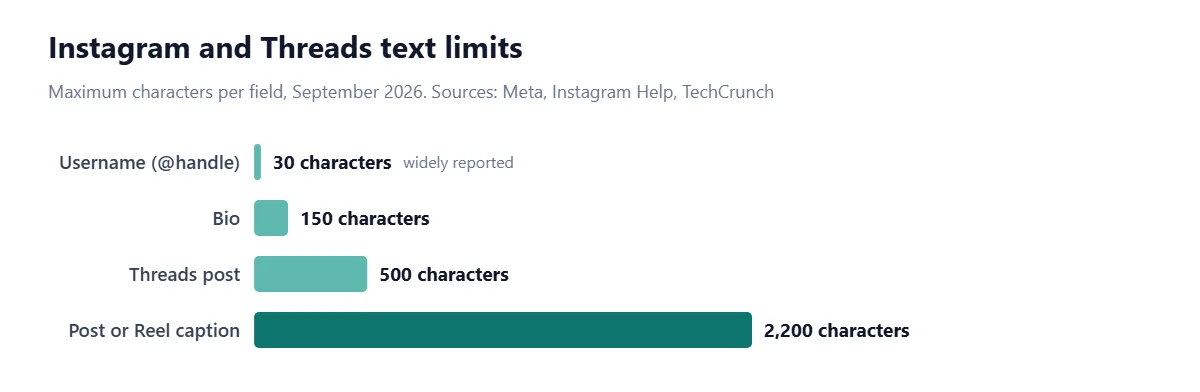
The "widely reported" rows come from social media tool makers that test the app directly, such as Sendible and Replug, both updated in 2026. They agree with each other, and the app enforces them, but Instagram doesn't list them on a help page we could access. Treat them as reliable, not guaranteed.
How many characters show before "more" on Instagram?
About 125 characters, which is roughly two lines on a phone (Sendible). After that, the caption is cut and readers have to tap "more" to see the rest.
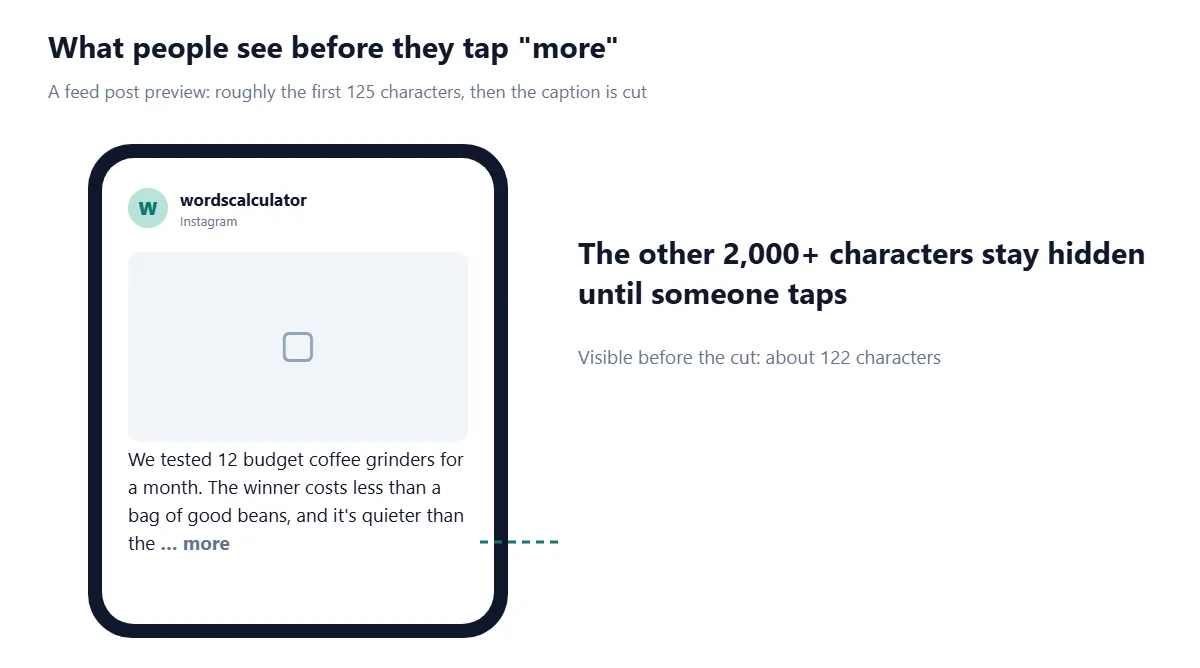
Treat 125 as a guide, not a hard number. The cut is based on space, not a character count, so it moves with screen size, font settings and line breaks. A caption that starts with a short line and then a line break can be cut after fewer characters than one long sentence.
Reels show even less. The caption sits over the video, and bundle.social puts the visible part at roughly 55 to 60 characters. Put the hook in the video itself and use the caption for context.
How many hashtags can you use on Instagram in 2026?
Five per post or Reel. Instagram announced on 18 December 2025 that it was reducing "the number of hashtags that you can include in a caption for a reel or post to five," with the change rolling out gradually (Social Media Today). The announcement came from Instagram's official creators account.
Before that, the limit was 30. You'll still see 30 in many 2026 guides, and Meta's API reference still lists "Maximum 30 hashtags" (Meta for Developers). Go with the newer announcement: it's the more recent statement from Instagram itself, and the app now enforces it.
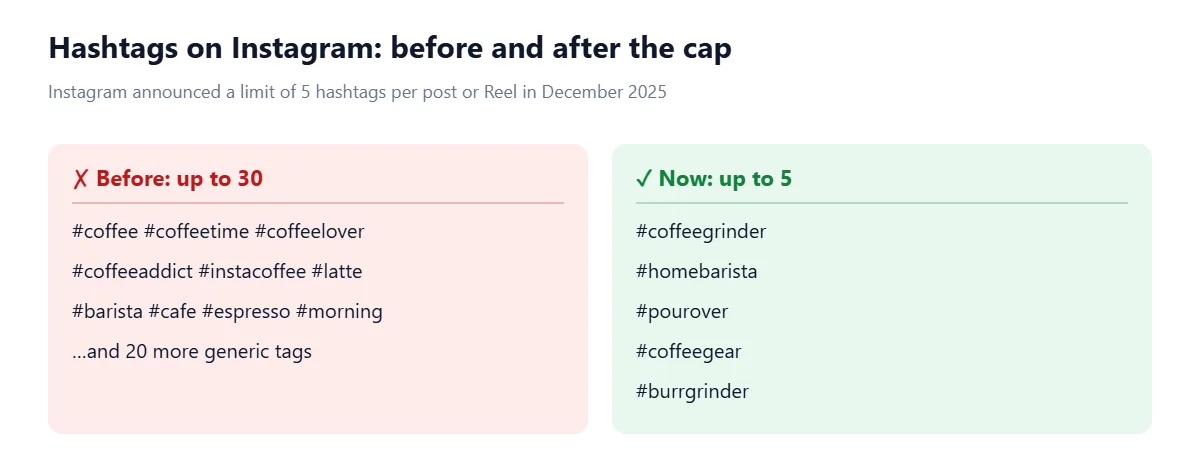
What happens if you add a sixth? Reports differ. Later says Instagram will either block publishing or remove the extra tags, and that the cap covers hashtags in your caption and first comment together. Others report that extra tags are simply ignored. Either way, anything past five does nothing for you, so the safe rule is five or fewer, in the caption.
Instagram's reasoning is that "fewer (up to 5) more targeted hashtags, rather than many generic ones" help both performance and the viewer's experience (Social Media Today). In practice that means picking tags people actually search or follow for your niche, not the biggest tags you can find.
Do hashtags and @mentions count toward the 2,200 characters?
Yes. Hashtags and mentions are part of the caption text, so every character counts, including the # and @ signs. Five hashtags averaging 14 characters, plus a space before each, use 75 characters.
Mentions have their own ceiling too. Meta's documentation allows a maximum of 20 @mentions in a caption (Meta for Developers). If you're crediting a big group, tag people on the photo instead of in the caption.
Instagram bio character limit
Your bio can be up to 150 characters. Instagram's Help Center says, "You can write a bio of up to 150 characters on your Instagram profile" (Instagram Help).
That's short, so every word has to earn its place. A structure that works for most accounts:
Who you are or what you do, in plain words people search for ("Home coffee gear reviews").
Proof or specifics: a number, a location, or what makes you different ("Tested 200+ grinders").
One call to action that points to your link ("New review every Friday").
Line breaks count as characters, so a bio split over four lines has three fewer characters to spend. Your name and link have their own fields, so don't repeat them in the bio.
Instagram username and name limits
Usernames can be up to 30 characters and may use letters, numbers, periods and underscores. Your display name, the bold name above your bio, is also limited to 30 characters. Both figures come from tool makers' testing (Sendible, Replug) rather than an Instagram page. The allowed characters (letters, numbers, periods and underscores) are listed by bundle.social.
Thirty characters is enough for a name plus a short descriptor. "Mia | Home Coffee Reviews" is 25 characters and tells visitors what the account is about before they read the bio.
Instagram comment, DM and Notes limits
Comments: 2,200 characters, the same as a caption. Short replies still get read more often than long ones.
Direct messages: 1,000 characters per message. Longer text needs to be split.
Notes: 60 characters. Notes are the short status bubbles above your inbox, so think headline, not message.
These three come from 2026 tool guides (Sendible, Replug), not an Instagram page, so check the counter in the app if you're right at the edge.
Reels captions and Threads limits
Reels share the 2,200-character caption and the 5-hashtag cap with feed posts. The difference is how much people see: the caption overlay on a Reel is short, so the first few words carry the whole message.
Threads, Instagram's text app, works differently. A Threads post is limited to 500 characters, but since September 2025 you can attach up to 10,000 characters of text to a post as a text attachment (TechCrunch). The attachment supports bold, italic and other formatting, but TechCrunch reports it isn't indexed by search engines.
How to write an Instagram caption that fits
Write the hook first, in under 125 characters. It has to work on its own, because that's all most people see.
Add the body. Use line breaks between ideas. Most useful captions land well under the limit; you rarely need all 2,200.
End with one question or call to action. One, not three.
Add up to five specific hashtags at the end or woven into the text.
Check the count before you post. Paste the caption into a counter and leave a small margin, since emoji and line breaks can be counted differently from one tool to the next.
If you draft long captions in Notes or Word, run them through a Text Cleaner first. Double spaces and stray line breaks waste characters and can look messy once posted.
Common Instagram caption mistakes
Still using 30 hashtags. Anything past five is dropped or blocked. Copy-pasted hashtag blocks from old posts are the usual culprit.
Burying the point. If your first 125 characters are "Happy Monday everyone, hope you all had a great weekend", nobody learns what the post is about.
Trusting a generic counter blindly. Emoji can be stored as several code units, so different tools may count them differently. Leave 20 or 30 characters of slack if you're near 2,200.
Forgetting the other platforms. A 2,200-character caption won't fit on X (280) or Threads (500). See our guides to the X character limit and LinkedIn character limits before cross-posting.
Our Character Limit Checker tests your caption against Instagram's limits alongside X, LinkedIn, YouTube and Google, so you can see at a glance whether the same copy works everywhere you plan to post it.
Frequently asked questions
What is the Instagram caption character limit?
Instagram captions can be up to 2,200 characters for both feed posts and Reels as of September 2026. Only about the first 125 characters show before the caption is cut off with "more".
How many hashtags can you use on Instagram?
You can use up to 5 hashtags per post or Reel. Instagram announced the cap in December 2025, replacing the old limit of 30.
What is the Instagram bio character limit?
An Instagram bio can be up to 150 characters, including spaces, emoji and line breaks.
How many characters show before "more" on Instagram?
About 125 characters, or roughly two lines on a phone. The exact cut depends on screen size and line breaks.
How long can an Instagram username be?
An Instagram username can be up to 30 characters and can contain letters, numbers, periods and underscores.
Do hashtags count toward the Instagram character limit?
Yes. Hashtags are part of the caption, so each one, including the # sign, counts toward the 2,200-character limit.
What is the character limit for Instagram comments?
Instagram comments can be up to 2,200 characters, the same as a caption, according to social media tool guides.
What is the character limit on Threads?
A Threads post can be up to 500 characters. You can add a text attachment of up to 10,000 characters for longer writing.
Sources
Meta. IG User Media reference. Meta for Developers, 2026.
Instagram. Add a bio to your Instagram profile. Instagram Help Center.
Social Media Today. Instagram implements new limits on hashtag use. 2025.
Later. Instagram hashtags in 2026. Later, 2026.
Sendible. Instagram character limit explained. Sendible, 2026.
Replug. Instagram character limits explained for 2026. Replug, 2026.
bundle.social. Instagram character limits in 2026. bundle.social, 2026.
TechCrunch. Threads lets users attach up to 10,000 characters of text. TechCrunch, 2025.

Comments