
How long should an email be? Most emails should be 50 to 125 words long. In an analysis of more than 40 million emails, messages in that range got replies more than 50% of the time, and response rates fell as emails got shorter or longer.
That range comes from a study with some quirks, and it doesn't fit every message. A newsletter or a project update has a different job from a quick request. Below you'll find where the numbers come from, lengths for each common type of email, how long subject lines and preview text should be, and a worked example of cutting an email in half.
What is the ideal email length?
The best-known data on email length comes from Boomerang, a Gmail and Outlook plugin. Its team looked at over 40 million emails where users had asked to be reminded if nobody replied, and compared reply rates with length (Boomerang, 2016). Their finding: "The sweet spot for email length is between 50-125 words, all of which yielded response rates above 50%."
Two other results from the same analysis are useful. Response rates "declined slowly from 125 word messages to 500 word messages", so going a little over isn't a disaster. And emails with a subject but nothing in the body were the worst performers, with only 11% getting a response. Short is good; empty isn't.
Keep the study's limits in mind. These were emails from Boomerang users who wanted a reply, mostly one-to-one messages, and the data is from 2016. It tells you what works for requests and conversations. It says much less about newsletters or announcements, where nobody is expected to write back.
Why shorter emails get more replies
People give email very little time. Litmus, which tracks billions of email opens, found the average time spent reading an email fell to about 9 seconds in 2022, down from 13.4 seconds in 2018 (MarketingProfs on Litmus data). Thirty percent of emails were looked at for less than 2 seconds.
Now do the arithmetic. At the average adult reading speed of 238 words per minute (Brysbaert, 2019), 9 seconds is enough to read about 36 words. That's roughly your first two sentences. Whatever you most need the reader to see, a question, a deadline, a decision, has to sit inside those first 36 words, however long the rest of the email is.
How long should an email be by type?
The 50–125 word range is the anchor for messages that need a reply. Other emails do other jobs, so they can run longer. These ranges are practical guidelines, not research findings:
Type of email | Suggested length | Why |
|---|---|---|
Quick reply or yes/no question | Under 50 words | One point, one answer |
Request or ask | 50–125 words | Peak reply range in the Boomerang data |
Cold sales or outreach email | 50–125 words | A stranger gives you seconds |
Follow-up | 25–75 words | Refer back; don't resend it all |
Meeting request | 50–100 words | Purpose, options, length |
Status update to a team | 100–250 words | Headlines first, detail below |
Newsletter | 200–600 words | Readers opted in, but still skim |
Anything over 500 words | Attach or link it | Reply rates keep falling |
Boomerang's own advice for very long messages was to send the content as an attachment instead. A two-line email with a linked document is easier to act on than 1,500 words of body text, and it gives the reader a clear place to comment.
How long should a cold email be?
Stay inside 50–125 words, and toward the lower end if you can. A cold email has to earn a reply from someone who owes you nothing, so every sentence should either explain who you are, show why the message is relevant to them, or make the ask.
One clear question. Boomerang found emails with one to three questions were 50% more likely to get a response than emails with none. More than that and replies fell off.
Plain language. Emails written at a third-grade reading level got a 53% response rate, against 39% for college-level writing. Simple words don't make you sound less expert; they make you faster to read.
No attachments on first contact. Link to one relevant page instead.
How long should an email subject line be?
In the Boomerang data, subject lines of 3 to 4 words drew the most responses, and emails with no subject line at all were answered only 14% of the time. Mailchimp's guidance for marketing email is "no more than 9 words and 60 characters" (Mailchimp).
The bigger constraint is the screen. Tests by EmailTooltester found that mobile apps show as few as 33 characters of a subject line before cutting it off, while Gmail on a wide desktop browser shows around 88 (EmailTooltester).
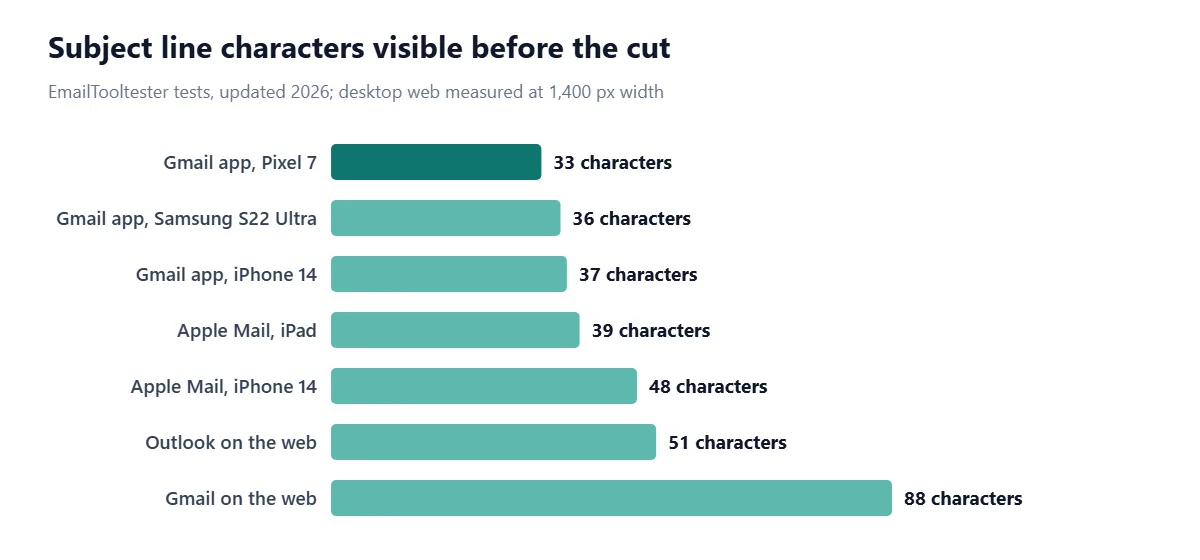
The practical rule: keep the words that matter in the first 33 characters, and treat anything after that as a bonus. You can check the length of a draft subject in the Character Counter. Mailchimp also suggests no more than one emoji and three punctuation marks per subject line, since heavy punctuation looks like spam.
For work email, a label at the front of the subject helps. A Harvard Business Review article on military-style email recommends starting subjects with keywords such as INFO, REQUEST or ACTION so the reader knows at once what's expected (Sehgal, HBR, 2016). "REQUEST: approve Q4 budget by Fri" fits in 33 characters and needs no opening.
How long should email preview text be?
Preview text (also called a preheader or snippet) is the line of grey text that follows the subject in most inboxes. Litmus recommends keeping it under 90 characters and putting the most important part at the start, because some clients show several lines and others show none (Litmus).
In a normal one-to-one email, the preview text is simply your first sentence. That's one more reason to open with the point rather than "Hope you had a good weekend".
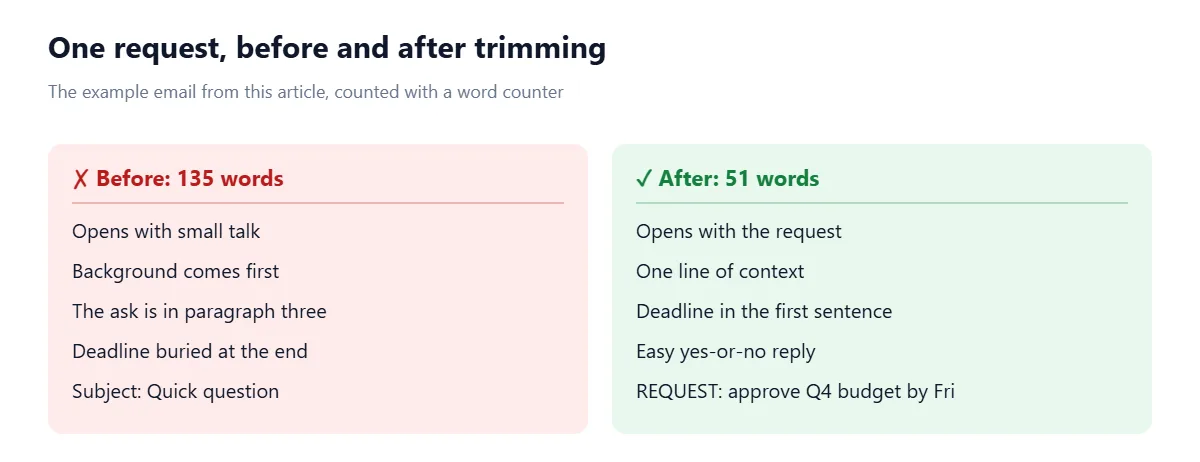
Example: cutting an email from 135 words to 51
Here's a typical request, written the way many of us write on a busy day:
The request, the deadline and the reason are all there, but the reader has to dig through 135 words to find them. Here's the same email rebuilt from the ask down:
How to write shorter emails
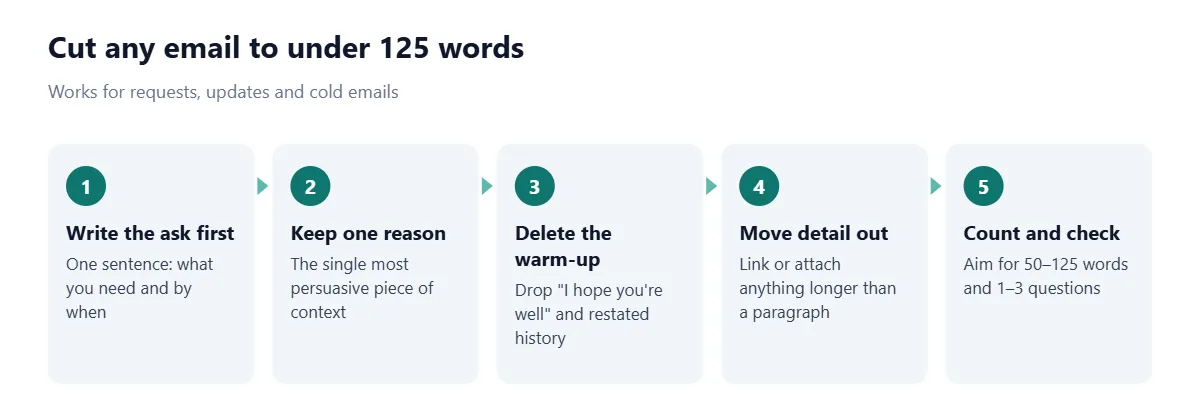
Cut the preamble. "I hope this finds you well" and "I wanted to reach out because" add words without adding meaning.
Don't retell the thread. If you're replying, the history is already below your message.
One email, one topic. Two unrelated requests in one message usually means one gets ignored. Send two short emails instead.
Use a short list for options. Three bullet points are faster to answer than a paragraph of alternatives.
Watch the size of HTML emails. Gmail clips messages whose code is over 102 KB, hiding the rest behind a link; images don't count toward that limit (Litmus).
Pasting text from another document often brings stray line breaks with it; the Text Cleaner strips them out before you send. And if you'd rather write in sentence case than Title Case for subject lines, our guide to title case vs sentence case explains the difference.
The quickest check is to paste your draft into the Word Counter before you hit send. If it's over 125 words, look for the paragraph you can move to a link or cut entirely.
Frequently asked questions
How many words should an email be?
Most emails should be 50 to 125 words. In Boomerang's study of 40 million emails, that range had reply rates above 50%.
How long should a cold email be?
Keep a cold email to 50 to 125 words with one clear question. Readers who don't know you give a message only a few seconds.
What is the best length for an email subject line?
Three to four words drew the most replies in Boomerang's data, and Mailchimp recommends no more than 9 words and 60 characters. Put the key words in the first 33 characters so they show on phones.
How many characters of a subject line show on mobile?
Between about 33 and 48 characters, depending on the app and phone, according to EmailTooltester's tests. The Gmail app showed the fewest.
How long should email preview text be?
Under 90 characters, according to Litmus, with the most important words first because some email clients show only part of it.
Is a 500-word email too long?
Usually, yes, for an email that needs a reply. Response rates decline slowly past 125 words, so move detail into an attachment or link and keep the body short.
How long do people spend reading an email?
About 9 seconds on average, according to Litmus data from 2022. That's enough time to read roughly 36 words.
Sources
Moore, A. 7 Tips for Getting More Responses to Your Emails (With Data). Boomerang, 2016.
MarketingProfs. How Much Time Do People Typically Spend Looking at an Email? (Litmus data). 2023.
Brysbaert, M. How many words do we read per minute? A review and meta-analysis of reading rate. Journal of Memory and Language, 2019.
Mailchimp. Best Practices for Email Subject Lines.
Brandl, R. and Ellis, C. Email subject line character limits. EmailTooltester, updated 2026.
Sehgal, K. How to Write Email with Military Precision. Harvard Business Review, 2016.
Litmus. Guide to email preview text support. 2025.
Litmus. How to Keep Gmail from Clipping Your Emails. 2024.

Comments